9 October 2026
I just wanted a cheap film camera, so I stitched 28 web scrapers together
I was trying to get my agent to find great second hand deals for me. Instead of me manually scanning hundreds and hundreds of ridiculous asking prices and scams, the agent would find a deal that suits my needs and is priced reasonably. I thought this would be a quick ask on ChatGPT.
I quickly realised the built in web search tool in OpenAI is quite weak and that a lot of great deals just would not show up compared with Google. This was with retail deals, so nevermind the fact that preowned item marketplaces was just completely inaccessible to ChatGPT. It would have to guess what prices would be and recommend if I buy or not. Even worse was the fact that the prices it fetched were often old cached indexes that are just plain outdated or wrong. I almost bought at some pretty horrible prices because of this…
How hard can it be?
OK, maybe a weekend job then. I connected Codex up to my Chrome and had it browse this way. It worked… barely. Having Codex navigate the browser and click around manually was so slow and token heavy that I became increasingly frustrated at my solution. Also at this point my ego started to kick in and I wanted to build a tool that can find the best deal for an item across the entire web! After all why not go all the way. (By the way I was/am shopping for a Contax S2 film camera)
How hard can it be to build a web browser that’s more efficient at deal scrapping and browser use? I started a new codebase from scratch and let Codex and Claude get to work. I had it reference all the best open source existing solutions and prioritise speed and reliability. Weeks had gone by at this point and it was going no where. Turns out the web really doesn’t want to be read by bots. Most marketplaces sit behind anti-bot services like Cloudflare, DataDome, PerimeterX and Akamai. They fingerprint everything from your TLS handshake to how your browser renders, and a headless browser sticks out a mile. Get past that and half the pages still come back empty, because the results load later with JavaScript. Worse, plenty of failures don’t look like failures at all: a challenge page, a sign-in redirect or a fake 404 served only to bots all come back as a perfectly normal HTTP 200, and the agent happily summarises a page with nothing on it. Every site breaks in its own way, so whatever fixed one site broke the next.
Off The Shelf
Why not just use existing mature solutions? I thought to myself. I then signed up to Browser Use, Tiny Fish and Firecrawl, as well as cloned some open source solutions like Steel Browser and Stagehand. None of them have full coverage!
There’s basically four kinds of tools out there and I tried a bit of everything. Agent browsers like Browser Use, TinyFish and Stagehand drive a real browser step by step. Great when you need to click through a checkout, but slow and token heavy when all you want is to read the page. Hosted browsers like Steel give you a browser in the cloud, but a browser is still a browser and gets blocked like one. Scrapers like Firecrawl are fast and hand you clean markdown, but still get stopped at some walls. And then there’s the stealth crowd, Camoufox and Scrapling, which are free and surprisingly good at sneaking past bot checks, but fiddlier to run. I’d also used Apify at work, which has a ready-made scraper for pretty much every site. It works, but it gets very expensive very quickly, and that’s before you’re checking hundreds of listings a day for one camera.
Later on, when I actually measured them one by one on 152 sites I’d never touched, the best of the lot, Firecrawl, read 80% of them. Zyte got 74%, plain HTTP 46%. The weird part was that every wall had a different winner. Camoufox got through PerimeterX when nothing else would, Firecrawl handled Cloudflare and DataDome, and Scrapling was best on the JavaScript-heavy stuff. Every tool was great somewhere and useless somewhere else.
The Stitched Monster
Eventually a light bulb went off in my brain. What if instead of re-inventing the wheel, we just stitched the best tools together? That’s how I arrived at the idea of Frankensurf. This way it can be as local and cheap as possible, and escalate to different levels of unblockers or batch processors depending on the calling agent’s needs.
So that’s what I built. Frankensurf sits in front of all those tools and gives my agent one call: read this page. It tries the cheapest thing first and only reaches for something heavier when it has to. Most pages never need more than a plain fetch, so most reads cost nothing.
The first time it actually worked felt spectacular. I pointed it at Crunchbase, which blocks pretty much everything. Plain HTTP: blocked. Headless Chrome: blocked. Steel: blocked. Camoufox: blocked. Firecrawl: in. One call, five tools, and a receipt showing every attempt along the way. I didn’t have to know which tool would work, it just figured it out.

Benchmark
Cool demo, but was stitching actually better than just using the best tool? Time to find out. Every tool got the same list of pages and the same pass/fail check: did it get the real content, or did it come back with a challenge page, a login wall or an empty shell?
I ran it on the sites I’d been testing with and it smashed everything, 98.7%. I just solved the internet! Of course, this was not the case when I expanded the benchmark to sites it had never seen and results plummetted. Great.
| Tested on (78 sites) | Never seen (45 sites) | |
|---|---|---|
| Firecrawl on its own | 88.5% | 73.3% |
| Frankensurf | 98.7% | 71.1% |
So my Frankenstein lost to one of its own body parts. And the reason was annoying. Most of the misses weren’t even blocks. Frankensurf would grab a page super fast with plain HTTP, see the site’s header and footer, and call it a win, when the actual results hadn’t loaded yet. It was confidently reading empty pages, which is exactly what burned me with ChatGPT in the first place.
So now it checks every page before accepting it. A search page needs actual results, a product page needs a price. If not, it tries the next tool up.
Benchmark II: Electric Boogaloo
For round two I wanted a fair fight, so I picked 152 sites before looking at a single one of them. Shops, marketplaces, real estate, jobs, travel, news, even a few government sites. Every tool had a go on its own, then Frankensurf, all in one run.
Frankensurf got 89.5%. Firecrawl got 80.3%. It finally beat Firecrawl, on sites it had never seen, and honestly that was the best feeling of the whole project. It also got stuck on about half as many sites (16 vs 30), and cost about a fifth as much, because the free tools handle most pages before anything paid gets touched.
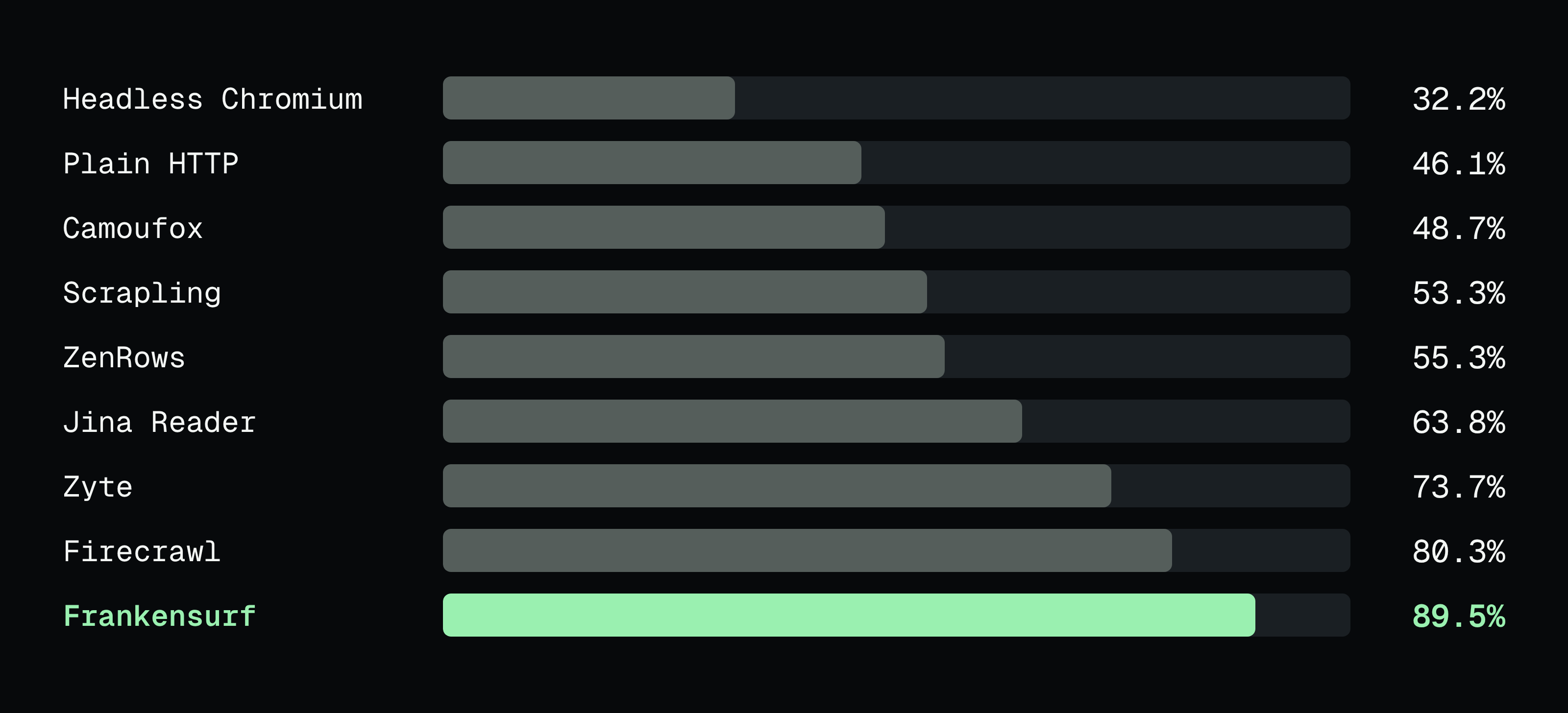
Not all wins though. It’s slower, 9.5 s per page vs Firecrawl’s 5.6 s, because it sometimes tries something cheap, rejects the page and climbs. Firecrawl went 8 for 8 on government sites, Frankensurf 7. And a few sites like Shopee and Temu still beat every tool I’ve got.
How it works (and what it costs)
It’s basically a ladder. Every read starts on the cheapest rung: plain HTTP, then Jina Reader, then a browser on my own machine. If a site blocks it, or hands back a page that isn’t real, it climbs. Stealth browsers like Camoufox and Scrapling next, then hosted browsers, then the paid unblockers like Firecrawl and Zyte, but only if you let it spend money. If even that fails, it can pop the page open for you to do the CAPTCHA yourself, then carry on.
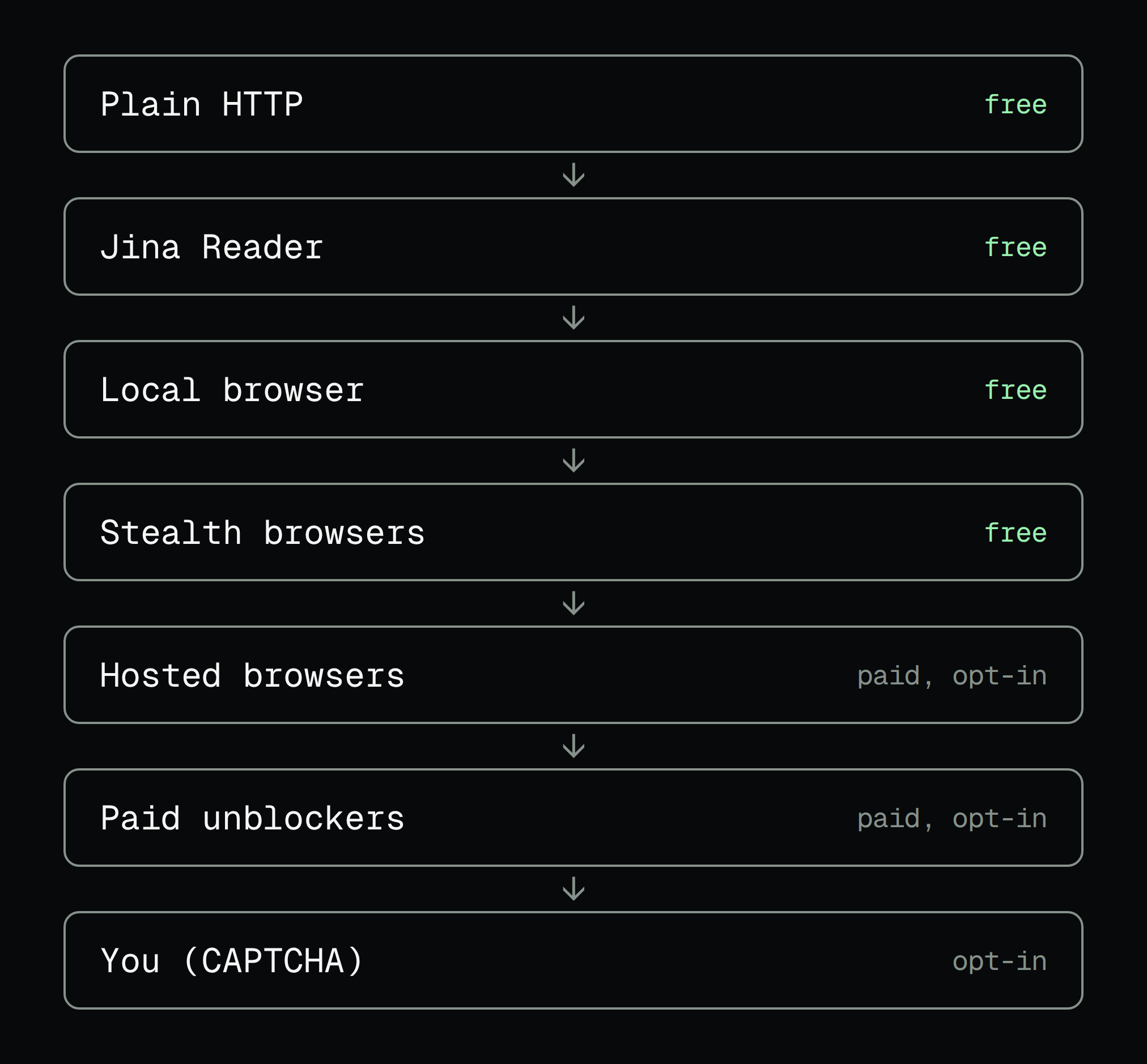
Every step lands in a receipt: what it tried, what failed, how long it took and what it cost. So when something goes wrong, you (or your agent) can actually see why instead of guessing.
The bit I like most is that every tool is just a plugin. When a new browser or unblocker comes out, it slots in as another rung and the ladder gets better without me rewriting anything. Same goes for sites: what an agent learns about a site gets saved as data, not code (more on that below).
The catch? It’s slower than going straight to the best tool, there are a lot of moving parts, the paid rungs cost real money if you turn them on, and it’s an alpha, so things will still change.
What it does for me now
Some core features I’ve added since then are structured output, verifying page content is complete, and recording user profiles that can be attached to any upstream provider tool.
Profiles first. I log into a site once, Frankensurf keeps the session encrypted on my machine, and any tool on the ladder can use it. That’s how my agent reads eBay sold prices as me, instead of guessing what things actually go for. The completeness check is the stuff from the benchmark: if the results never loaded, it doesn’t pretend they did. And structured output means my agent gets clean rows (title, price, location, when the auction ends, a photo) instead of a wall of HTML.
That last one came straight out of a real deal hunt. On Grays, an auction site, I searched for cameras and got back a page full of wine. It looked like a perfectly normal results page. Turns out Grays only listens to q= in the search URL, and anything else silently shows you its default feed. Now Frankensurf notices when the results don’t mention what you searched for. And the agent can save what it figured out as a site module: the real search URL, where the results hide in the page, which fields to keep. Next time it just knows Grays, and gets 40 lots with prices and photos from one page load. If Grays changes something, the module’s own checks flag it.
It’s not read-only either. Frankensurf can also act in my own logged-in Chrome: fill in a form, click a button, then check the page says what it should. But being able to read a site never means it’s allowed to write to it. Every action needs its own explicit grant: which site, which kinds of steps, and whether it’s allowed to touch anything involving money or my account. Password fields, file uploads and random JavaScript are blocked outright.
Every action also gets a unique key, so a flaky connection can’t submit the same thing twice, and it keeps before and after snapshots of the page. And it never claims something worked just because the clicks went through. It tells you the steps ran, then you read the page to check. That’s the bit I’ll need when my agent finally finds a Contax and has to send the seller an offer.
Still looking for a Contax
So did my agent find me a Contax S2? Nope, not yet. They’re rare and everyone knows what they’re worth. But it now checks Gumtree, eBay, Facebook Marketplace and the auction sites for me, so I’m not scrolling through hundreds of listings, and it’s not reading empty pages anymore. Small wins.
Frankensurf is open source and very much an alpha. Just want users, feedback and contribution. If you’ve got a site it can’t read, throw it at me: github.com/yail259/frankensurf